
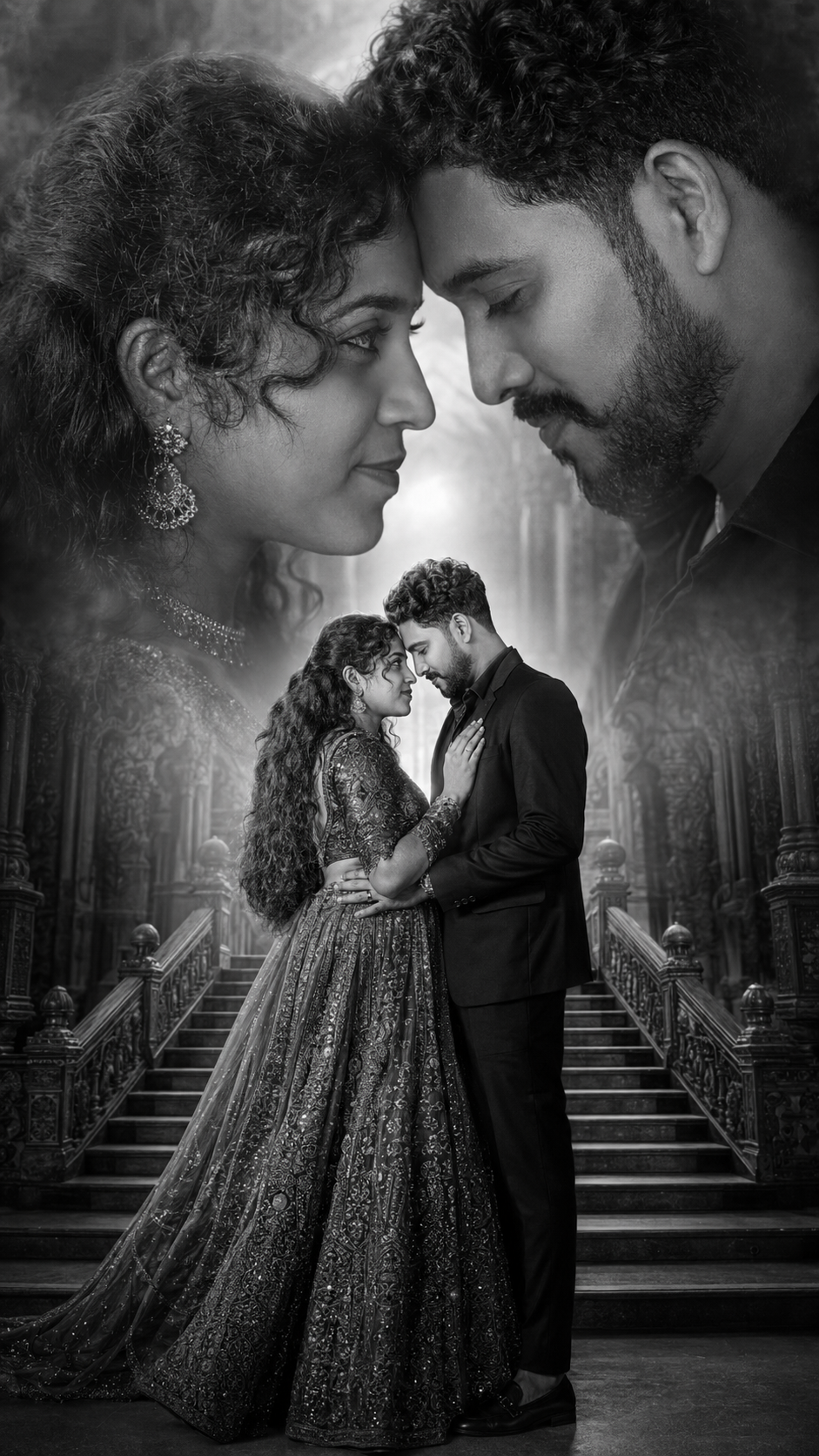
*Double Exposure Style Photo Editing* Double exposure is that dreamy, layered look where two images blend into one. Think silhouette filled with a forest, or a portrait mixed with city lights. Here’s your blog content broken into 3 parts you can post as-is or expand.*Part 1: What Is Double Exposure & Why It Works*- *Definition*: Double exposure started on film cameras when you snapped two photos on the same frame. Now we recreate it digitally by blending two images with masks and blend modes.- *Why it’s popular*: It tells two stories at once. A person + nature = connection. A face + skyline = ambition. It’s instant emotion and symbolism.- *Best image combos*: 1. *Portrait + Texture*: Silhouette + trees, clouds, water, or smoke 2. *Object + Scene*: Coffee cup + cozy café, guitar + concert crowd 3. *Contrast themes*: Human + architecture, calm face + stormy sea- *Pro tip*: Use high-contrast silhouettes for your base image. White background, dark subject makes masking 10x easier.*Part 2: How to Create Double Exposure in 5 Steps* You can do this in Photoshop, Canva, PicsArt, or even Snapseed. Here’s the Photoshop version:1. *Pick your base image*: Choose a clean side-profile or backlit portrait. Cut out the subject if needed.2. *Add your second image*: Place the texture/landscape over the portrait. Scale it to cover the main area of the subject.3. *Change blend mode*: Set the top layer to `Screen`, `Lighten`, or `Overlay`. `Screen` works best for dark portraits.4. *Mask it out*: Add a layer mask to the texture layer. Use a soft black brush to hide parts you don’t want, keeping the blend mostly inside the silhouette.5. *Adjust & unify*: Lower opacity to 70-90%. Add a gradient map or color grade so both images share the same tone. Slight grain sells the film look.*Phone apps shortcut*: PicsArt → Add Photo → Blend → Lighten. Snapseed → Double Exposure tool → pick image → use brush to erase.*Part 3: Creative Ideas + Common Mistakes to Avoid*- *Creative ideas to try*: 1. *Seasonal mood*: Portrait + autumn leaves for fall vibes, + ocean waves for summer 2. *Storytelling*: Musician + sound waves, traveler + map texture 3. *Color theme*: Keep both images in the same color family. Blue portrait + blue city = cohesive- *Common mistakes*: 1. *Too busy*: If both images are detailed, it turns into chaos. One should be simple. 2. *Bad contrast*: Gray-on-gray doesn’t pop. You need light + dark playing together. 3. *No focal point*: The eye needs somewhere to land. Make sure the face/eyes are still clear.- *Final polish*: Add subtle vignette and dust overlays. Export in high res. Instagram loves 1080x1350px vertical.Want me to turn this into a carousel caption series too, or give you Lightroom preset tips for the color grading?
✅✅👇 Prompt, 👇✅✅
Create an ultra-realistic cinematic romantic couple poster in 9:16 vertical ratio, featuring the uploaded couple with 100% facial identity preservation, natural expressions, realistic skin texture, and ultra-detailed facial features. Premium Photoshop manipulation, wedding photography style, HDR quality, 4K ultra-high resolution, sharp focus, realistic hair strands, professional retouching, cinematic depth of field.
Composition: A dramatic double-exposure black-and-white masterpiece. The left side features a giant close-up profile portrait of the bride, while the right side features a giant close-up profile portrait of the groom. Their faces are positioned extremely close, forehead-to-forehead and nose-to-nose, creating an intimate romantic connection. Between the two large portraits, a full-body image of the couple stands elegantly on grand palace stairs. The groom wears a premium black suit, gently holding the bride, while the bride wears a luxurious embroidered traditional lehenga with elegant jewelry. Both look at each other lovingly.
Background: Majestic palace entrance with grand stairway, subtle architectural details, soft atmospheric fog, cinematic light rays, glowing horizon, luxury wedding backdrop, dramatic monochrome tones.
Lighting & Mood: Soft cinematic rim lighting, high contrast black-and-white grading, gentle warm golden glow at the center, dramatic shadows, premium wedding poster aesthetic, emotional romantic atmosphere, luxury magazine cover quality.
Quality Enhancements: Ultra-detailed facial textures, realistic eyes, enhanced skin details, HDR lighting, professional color grading, high-end wedding photography look, crystal-clear clarity, noise-free image, depth and dimension, masterpiece composition, 8K quality, award-winning portrait photography, premium cinematic poster design.
Negative Prompt: blurry face, distorted features, extra fingers, duplicate persons, low resolution, cartoon effect, overexposed highlights, artificial skin, bad anatomy, cropped faces, watermark, text, logo, frame, noise, pixelation, oversharpening, unrealistic proportions.