
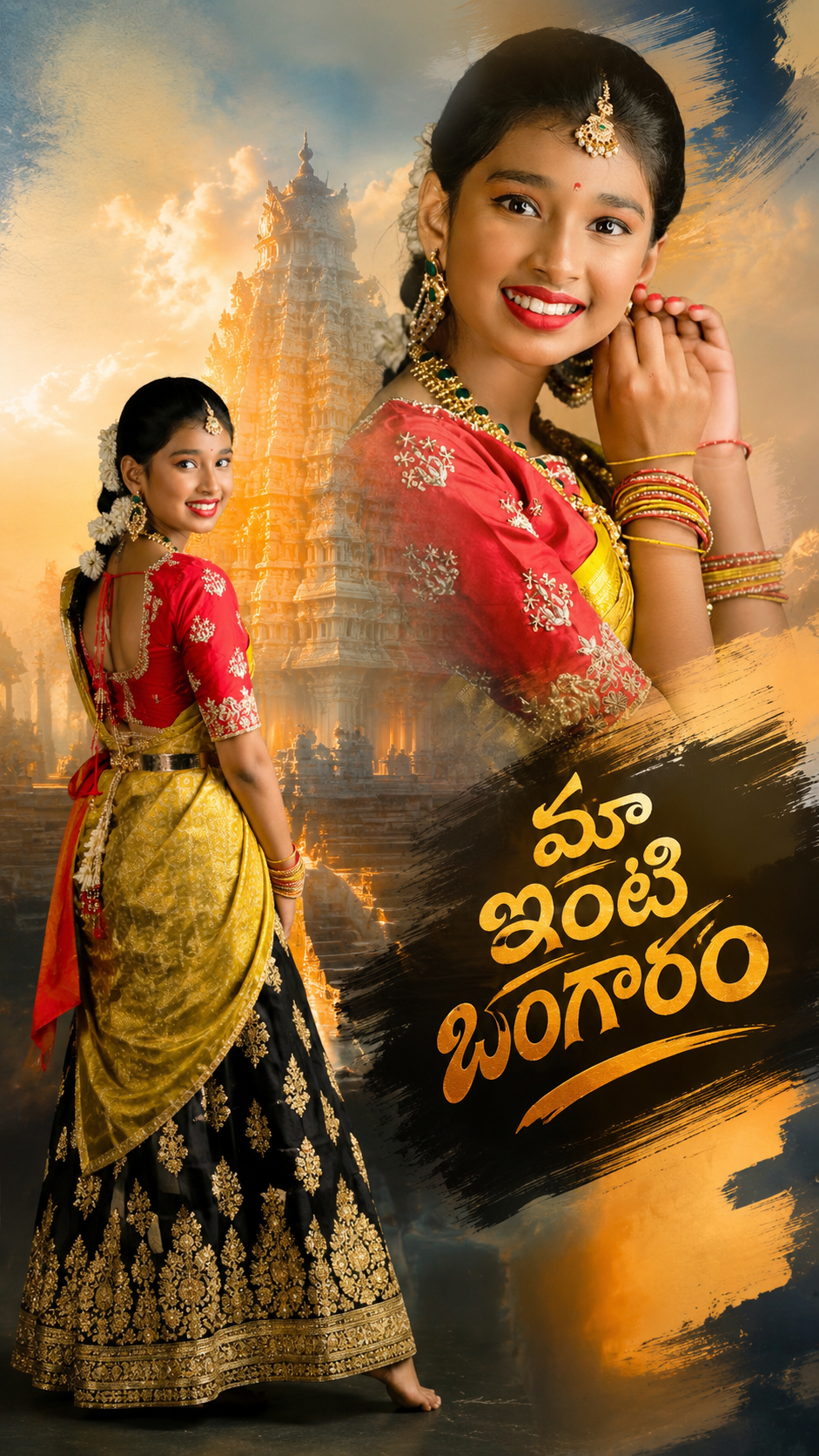
Got you — Double Exposure photo editing is blowing up again in 2026 🔥
It’s that dreamy look where 2 photos blend into one, like a portrait inside a cityscape or nature inside a silhouette. Super popular for reels covers, Instagram carousels, and AI edits right now.
Here’s blog content split into 3 parts you can publish as a series:
Part 1: What is Double Exposure and Why It’s Trending Again in 2026
Hook: One photo tells a story. Two photos layered together tell a feeling.
Double exposure started in film cameras, but today it’s the go-to aesthetic for creators who want “cinematic + emotional” vibes without shooting an expensive campaign.
Why it’s trending now:
- AI tools made it 1-click: Apps like PicsArt, Snapseed, and new Muse Spark filters can blend a portrait + texture in seconds
- Storytelling reels: Creators use double exposure intros to show “who I am vs what I do” — face + work, dancer + music waves, traveler + map
- Brand aesthetic: Fashion and music artists in India and globally are using it for album covers and profile pics because it looks artsy but minimal
The vibe for 2026: Less random overlays, more intentional storytelling. Think: your silhouette filled with Eluru street lights, or your face filled with temple architecture + bokeh.
Part 2: How to Create a Trending Double Exposure Edit – Tools + Steps
You don’t need Photoshop skills anymore. Here’s the 2026 creator workflow:
Best tools right now:
- Mobile: PicsArt “Double Exposure”, Snapseed “Double Exposure”, Canva AI Blend
- AI: Muse Spark photo filters, Remini, Lens Distortions app
- Desktop: Photoshop Blend Mode “Screen”, Lightroom overlays
3-step formula that works:
- Pick 2 contrasting photos
- Photo 1: High contrast portrait or silhouette with plain background
- Photo 2: Texture – nature, city lights, ink, clouds, architecture
- Blend smart
- Use “Screen” or “Lighten” blend mode
- Mask out the background so only the subject shows the texture
- Adjust opacity to 60-80% so both images breathe
- Make it 2026-trendy
- Add grain + warm tones
- Color grade with teal/orange or moody blue
- Export 1080×1350 for Instagram and add a 3D text title on top
Pro tip: The trend now is “motion double exposure” for reels. Animate the texture layer so clouds or lights move inside the portrait.
Part 3: 5 Double Exposure Ideas Going Viral + Tips to Stand Out
Don’t just copy the “face + galaxy” look. These 5 angles are performing best:
- Identity Story: Portrait filled with your passion — coder + code, chef + spices, dancer + motion blur
- Travel Memory: Silhouette filled with the place you visited — mountains, beaches, Hyderabad night skyline
- Nature + Human: Eco brands love this. Person filled with leaves, water, or animals
- Lyric Visual: Music creators overlay song lyrics typography inside the subject
- Before/After Duality: Same person, two moods. Calm texture on one side, chaos on the other
3 tips to make yours pop:
- Lighting match: Both photos should have similar light direction or it looks fake
- Negative space: Use solid backgrounds. Busy backgrounds kill the effect
- Caption it: People engage more when you explain the 2 layers. Ex: “Me + The city that raised me”
Want me to turn this into full 800-word blog posts with SEO titles and meta descriptions for each part?
Or should I also give you 10 caption + hashtag sets for double exposure posts so you can drop them on Instagram right away?
👇✅ Prompt ✅👇
Ultra-Realistic Cinematic Portrait Prompt (9:16 | Same-to-Same Identity | Premium Temple Theme | Photorealistic)
Prompt:
Use the uploaded image as the exact face and outfit reference. Preserve 100% original identity, exact facial features, hairstyle, skin tone, eyebrows, eyes, smile, nose, lips, body proportions, jewelry placement, saree draping, blouse design, lehenga embroidery, pose, and expression. Do not beautify, modify, regenerate, or alter the face in any way. The output must look like the same person captured with a premium DSLR camera.
Create a 9:16 vertical cinematic portrait featuring the girl in the same black embroidered lehenga with bright pink saree, wearing the same necklace, earrings, maang tikka, bangles, waist belt, and floral hair decoration. Maintain the same standing pose for the full-body portrait and the same close-up facial expression for the side portrait.
The background should feature a grand South Indian temple (gopuram) with intricate carvings, soft morning mist, glowing golden sunlight, cinematic volumetric light rays, subtle blue sky gradients, and a premium devotional atmosphere. Add realistic depth of field with soft bokeh while keeping the subject perfectly sharp.
Use HDR lighting, ultra-detailed textures, natural skin tones, realistic fabric folds, premium color grading, DSLR depth of field, 85mm lens look, f/1.8 aperture, global illumination, ray-traced lighting, ultra-sharp focus, high dynamic range, photorealistic shadows, and realistic reflections on jewelry.
Composition:
Right Side: Large waist-up close-up portrait.
Left Side: Full-body standing portrait in the same pose.
Center Background: Majestic temple gopuram with cinematic glow.
Clean premium composition with no extra objects.
Output Specifications:
Aspect Ratio: 9:16
Resolution: 2304 × 4096 (8K Ultra HD)
Ultra-Realistic
Photorealistic
DSLR Quality
Premium Cinematic Color Grading
Sharp Focus
No watermark
No text
No logo
No face change
No pose change
No outfit change
No jewelry change
Same-to-same identity preservation.
Off body pic not right side only Backside double exposer style Temple moving right side and closep photo double exposer style in sky
Right side Brush stroke text ” మా ఇంటి బంగారం” stylish font